Subscription
A paid subscription is required for all AirShop organizations. Organization administrators manage plans and payment at airshop.work/subscription.
Subscription vs. customer payments
This page is your AirShop subscription (paying for app access).
Customer quote payments (deposits, milestones, and invoice links on your own Stripe account) are configured separately. See Quotes & invoicing with Stripe Connect.
Plans & Pricing
AirShop offers four self-serve subscription tiers. Current prices appear on the Subscription page.
| Plan | Price | Billing | Users | Best for |
|---|---|---|---|---|
| Solo | $35/mo | Monthly only | 1 | Solo operators and side projects |
| Starter | $99/mo | Monthly or annual | Up to 2 | Freelancers and small shops |
| Team | $299/mo | Monthly or annual | Up to 10 | Growing businesses |
| Pro | Custom | Contact us | Unlimited | Larger teams with unique needs |
Starter and Team include a discount when you pay annually. Solo is monthly only.
What's included
Solo
- 1 user
- 10 quotes per month
- 10 orders per month
- Core AirShop features within those limits
Solo does not include Shopboard Sync (live inquiry and quote updates on a shop floor display). Solo organizations enrolled in the Shopboard private beta may use Shopboard in personal mode only. See Shopboard.
Starter, Team, and Pro
- All core features (quotes, inventory, inquiries, customers, payments, and integrations)
- Shopboard Sync on Starter and above: connect a Raspberry Pi shop floor display for live AirShop activity (private beta; org enrollment required)
- Support level varies by plan (email and chat on Starter, priority on Team, dedicated on Pro)
Pro pricing is custom. Use Contact Us on the Subscription page or book a demo.
AI assistant (MCP) is in beta. Subscribed customers request access at Settings → Integrations → AI assistant (MCP). That page stays open without beta access. See AI assistant (MCP).
Each team member must have their own user account. Sharing a single login across multiple people is not permitted. We monitor for misuse.
How to Subscribe
- Go to Subscription (or Settings → Subscription, or the Subscription link in the left nav).
- Choose monthly or annual billing (Solo is monthly only).
- Select a plan (Solo, Starter, Team, or Pro).
- Click Subscribe to open Stripe Checkout.
- Enter your payment details and complete the checkout.
After payment succeeds, your organization is active and you can continue using AirShop.
Managing Your Subscription
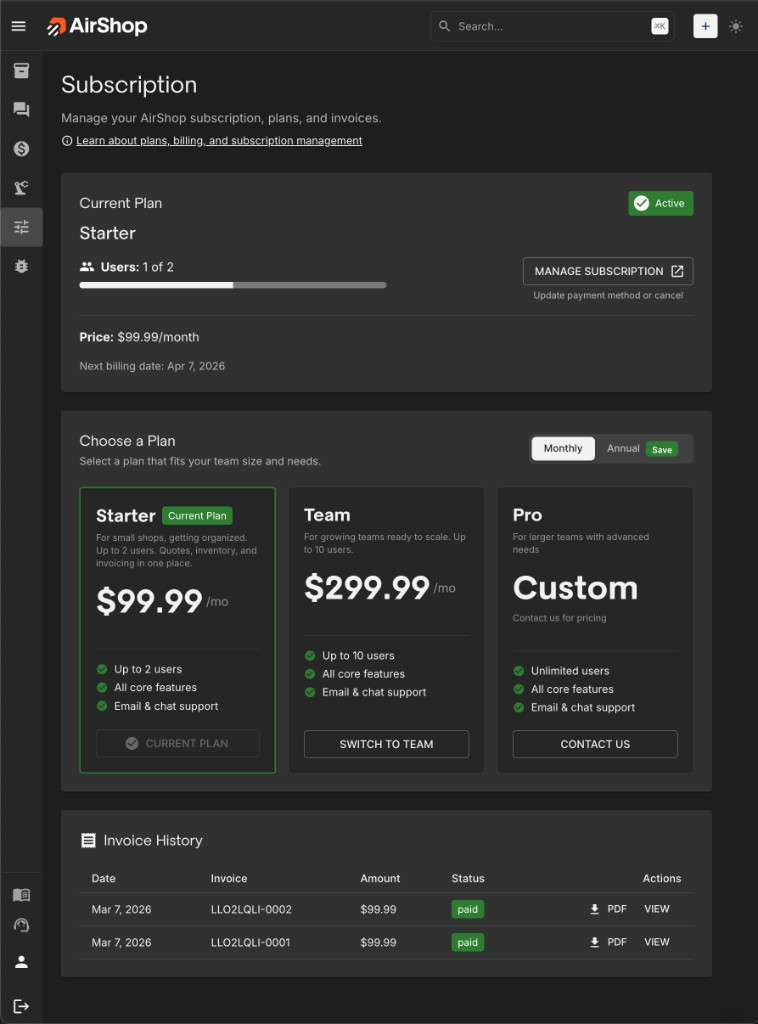
Screenshot shows a Starter subscription example. The live Subscription page lists Solo, Starter, Team, and Pro; plan cards and features may differ from this capture.
Use Manage subscription on the Subscription page to open the Stripe Customer Portal. There you can:
- Update your payment method
- Change your plan (upgrade or downgrade)
- Switch between monthly and annual billing (Starter and Team only)
- Cancel your subscription
- View and download invoices
The payment portal opens in a new tab.
Upgrade & Downgrade
| When | What happens | |
|---|---|---|
| ↑ Upgrade (tier or monthly→annual) | Immediate | Prorated charge for rest of billing period |
| ↓ Downgrade (tier or annual→monthly) | End of period | Keep current plan until renewal |
| User limit | Before downgrade | Remove users first if over new plan's slots |
Invoice History
Past invoices for your AirShop subscription appear on the Subscription page. You can also view and download invoices from the Stripe Customer Portal (via Manage subscription).
Trial
New organizations receive a 14-day free trial with full Team features. During the trial:
- A trial banner in the nav shows how many days remain.
- When the trial is about to end, you'll see alerts prompting you to subscribe.
When the trial ends, you must subscribe to continue using AirShop. Go to Subscription to choose a plan and complete checkout.
Who Can Manage Subscription
Only Organization Administrators can access the Subscription page and manage plans and payment. If you're not an admin, you'll see a message to contact your organization admin.
Admins can manage subscription from Settings or the Subscription link in the left nav.
Payment Issues
Past due — If a payment fails, you have a grace period to update your payment method. Alerts will prompt you.
Blocked access — If payment isn't updated or your subscription is canceled, access may be blocked. The Subscription page stays accessible so you can update payment or reactivate.
Reactivating — Go to Subscription and update your payment method (if past due) or subscribe again (if canceled).
Subscription Flow
flowchart TD
    subgraph access [Access]
        Admin[Org Admin]
        NonAdmin[Non-Admin]
    end
    Admin --> SubPage[Subscription Page]
    NonAdmin --> ContactAdmin[Contact your admin]
    SubPage --> CurrentPlan[View current plan]
    SubPage --> Subscribe[Subscribe or change plan]
    SubPage --> Manage[Manage subscription]
    SubPage --> Invoices[View invoices]
    Subscribe --> StripeCheckout[Stripe Checkout]
Manage --> StripePortal[Stripe Customer Portal]Related
- Shopboard — Shop floor displays, Shopboard Sync, and plan requirements
- Quotes & invoicing with Stripe Connect — Collecting deposits or milestones from your customers (separate from your AirShop subscription here).
- Setup FAQ
- Glossary — Subscription, Organization Administrator