Subscription
A paid subscription is required for all AirShop organizations. Organization administrators manage plans and payment at airshop.work/subscription.
Subscription vs. Billing
This page covers your subscription to AirShop (app access).
Billing—invoicing your customers for quotes is a coming soon airshop.work/billing
Plans & Pricing
AirShop offers three subscription tiers:
| Plan | User Limit | Best For |
|---|---|---|
| Starter | Up to 2 users | Freelancers and small shops |
| Team | Up to 10 users | Growing businesses |
| Pro | More than 10 users | Larger teams, unique needs |
Current plans and pricing are shown on the Subscription page. You can choose monthly or annual billing for a discount.
Each team member must have their own user account. Sharing a single login across multiple people is not permitted. We monitor for misuse.
How to Subscribe
- Go to Subscription (or Settings → Subscription, or the Subscription link in the left nav).
- Choose monthly or annual billing.
- Select a plan (Starter, Team, or Pro).
- Click Subscribe to open Stripe Checkout.
- Enter your payment details and complete the checkout.
After payment succeeds, your organization is active and you can continue using AirShop.
Managing Your Subscription
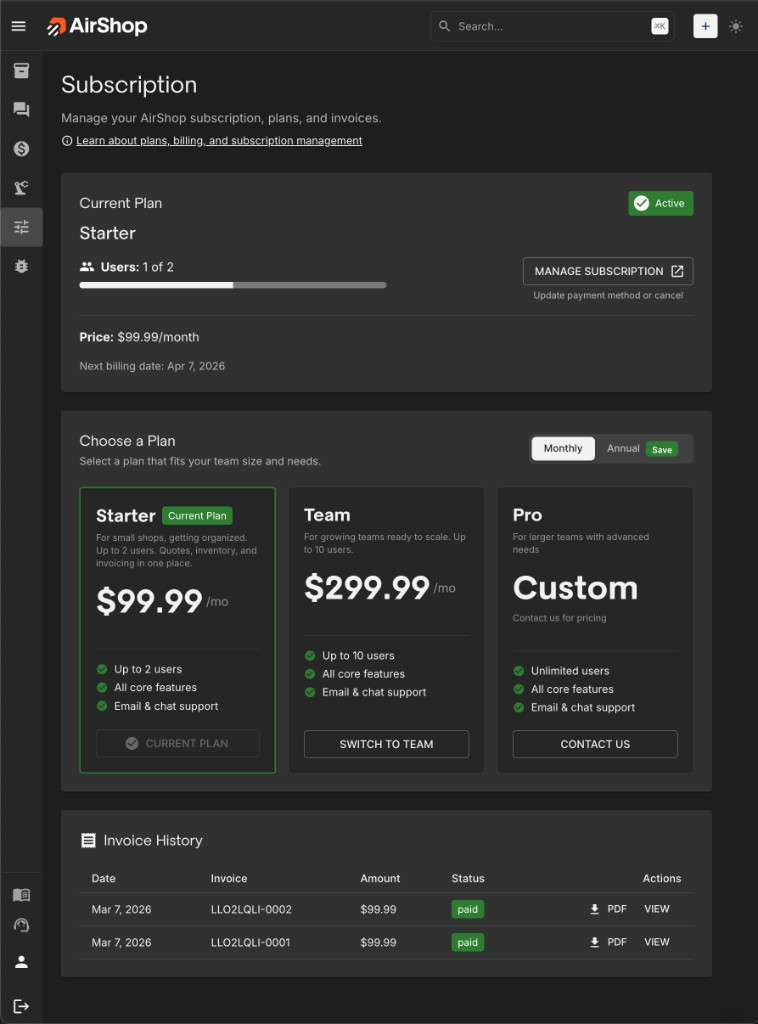
Use Manage subscription on the Subscription page to open the Stripe Customer Portal. There you can:
- Update your payment method
- Change your plan (upgrade or downgrade)
- Switch between monthly and annual billing
- Cancel your subscription
- View and download invoices
The payment portal opens in a new tab.
Upgrade & Downgrade
| When | What happens | |
|---|---|---|
| ↑ Upgrade (tier or monthly→annual) | Immediate | Prorated charge for rest of billing period |
| ↓ Downgrade (tier or annual→monthly) | End of period | Keep current plan until renewal |
| User limit | Before downgrade | Remove users first if over new plan's slots |
Invoice History
Past invoices for your AirShop subscription appear on the Subscription page. You can also view and download invoices from the Stripe Customer Portal (via Manage subscription).
Trial
New organizations receive a 14-day free trial with full Team features. During the trial:
- A trial banner in the nav shows how many days remain.
- When the trial is about to end, you'll see alerts prompting you to subscribe.
When the trial ends, you must subscribe to continue using AirShop. Go to Subscription to choose a plan and complete checkout.
Who Can Manage Subscription
Only Organization Administrators can access the Subscription page and manage plans and payment. If you're not an admin, you'll see a message to contact your organization admin.
Admins can manage subscription from Settings or the Subscription link in the left nav.
Payment Issues
Past due — If a payment fails, you have a grace period to update your payment method. Alerts will prompt you.
Blocked access — If payment isn't updated or your subscription is canceled, access may be blocked. The Subscription page stays accessible so you can update payment or reactivate.
Reactivating — Go to Subscription and update your payment method (if past due) or subscribe again (if canceled).
Subscription Flow
flowchart TD
    subgraph access [Access]
        Admin[Org Admin]
        NonAdmin[Non-Admin]
    end
    Admin --> SubPage[Subscription Page]
    NonAdmin --> ContactAdmin[Contact your admin]
    SubPage --> CurrentPlan[View current plan]
    SubPage --> Subscribe[Subscribe or change plan]
    SubPage --> Manage[Manage subscription]
    SubPage --> Invoices[View invoices]
    Subscribe --> StripeCheckout[Stripe Checkout]
    Manage --> StripePortal[Stripe Customer Portal]